Halloween is one of the most creative times of the year, and photo editing has become a huge part of the celebration. Whether you want to transform a simple selfie into a spooky portrait or give your pet a festive makeover, adding Halloween-themed elements to photos is a fun and easy way to get into the spirit. With the rise of AI-powered editing tools, you no longer need professional design skills to create stunning Halloween images. All you need is the right tool and a little creativity.
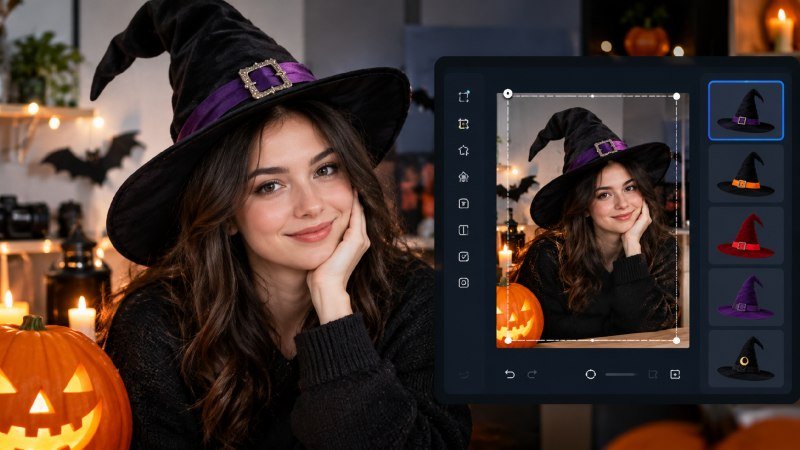
One of the most popular Halloween edits right now is placing a classic witch hat on a person or character in a photo. If you want to add witch hat to photo, tools like CapCut make the process incredibly simple and fast. Instead of spending hours in complex software, you can achieve a realistic and fun result in just a few clicks. These AI-driven tools automatically detect the head in your photo and place the hat in a natural position, saving you time and effort.
Why Halloween Photo Editing Is So Popular
Social media has changed the way people celebrate holidays. Every October, platforms like Instagram, TikTok, and Facebook are flooded with Halloween-themed content. People love sharing creative, edited photos that show off their festive spirit without needing a full costume. Photo editing tools have made it possible for anyone to join in, regardless of their technical background.
Halloween edits are popular for several reasons:
- They are quick and easy to create with modern AI tools
- They allow people to celebrate without buying physical costumes
- They are perfect for profile pictures, stories, and posts
- They can be applied to pets, children, and group photos
- They generate high engagement on social media platforms
What Makes a Good Halloween Photo Editing Tool
Not all photo editing tools are created equal. When choosing a tool for Halloween edits, there are a few key features to look for to ensure you get the best results.
AI-Powered Object Placement
The best tools use artificial intelligence to detect faces and heads in photos automatically. This means the witch hat or other Halloween accessory is placed in a realistic position without you having to manually adjust it. AI placement looks more natural and saves a lot of time.
Easy-to-Use Interface
A good Halloween editing tool should be accessible to everyone, including people with no design experience. Simple drag-and-drop features, one-click effects, and clear instructions make the editing process enjoyable rather than frustrating.
High-Quality Output
The final image should look clean and professional. Low-quality tools often produce blurry edges or poorly blended elements that look fake. Look for tools that maintain the original photo quality while adding new elements seamlessly.
Variety of Halloween Elements
Beyond witch hats, a great Halloween editing tool should offer a range of spooky accessories and effects, such as:
- Vampire fangs and capes
- Ghost overlays
- Pumpkin decorations
- Spooky backgrounds
- Skeleton and zombie effects
Step-by-Step Guide to Adding a Witch Hat to Your Photo
Using a tool like CapCut, the process of adding a witch hat to your photo is straightforward. Here is a simple guide to get you started:
- Open the photo editing tool on your browser or device
- Upload the photo you want to edit
- Select the Halloween accessories section or sticker library
- Choose the witch hat from the available options
- Let the AI automatically place the hat on the head in the photo
- Adjust the size, angle, or position if needed
- Apply any additional effects like shadows or color adjustments
- Download the finished image in high resolution
The entire process usually takes less than two minutes, making it perfect for quick social media posts or last-minute Halloween content.
Tips for Getting the Best Results
To make your Halloween photo edits look as realistic as possible, keep these tips in mind:
- Use a photo with good lighting and a clear view of the subject’s head
- Choose a hat style that matches the overall mood of the photo
- Adjust the hat’s shadow to match the lighting in the original image
- Experiment with different angles to find the most natural-looking placement
- Add complementary effects like a dark background or fog for extra atmosphere
Conclusion
Halloween photo editing has never been easier, thanks to modern AI-powered tools that handle the hard work for you. Whether you are creating content for social media, sending festive messages to friends, or just having fun with your photos, adding a witch hat or other Halloween accessories can instantly transform any image into something spooky and memorable. With user-friendly platforms available online, anyone can create professional-looking Halloween edits in minutes. So grab your favorite photo, fire up an editing tool, and get ready to celebrate the season in style.